

Last week's column covered the rumor — an always-on OpenAI agent leaked ahead of DevDay. At DevDay 2026 on September 29, it became an announced product: Dots, always-on autonomous agents designed to automate recurring tasks and operate continuously in the background, learning user priorities and freeing users from one-prompt-at-a-time interactions. OpenAI unveiled over 20 updates across ChatGPT, Codex, and its model ecosystem; Dots led the announcements. (OpenAI DevDay 2026 brings new AI agents, developer tools — TechGig)
What follows is the operator's reading — what's real, where the failure modes are, and what deserves your attention.
What OpenAI actually shipped
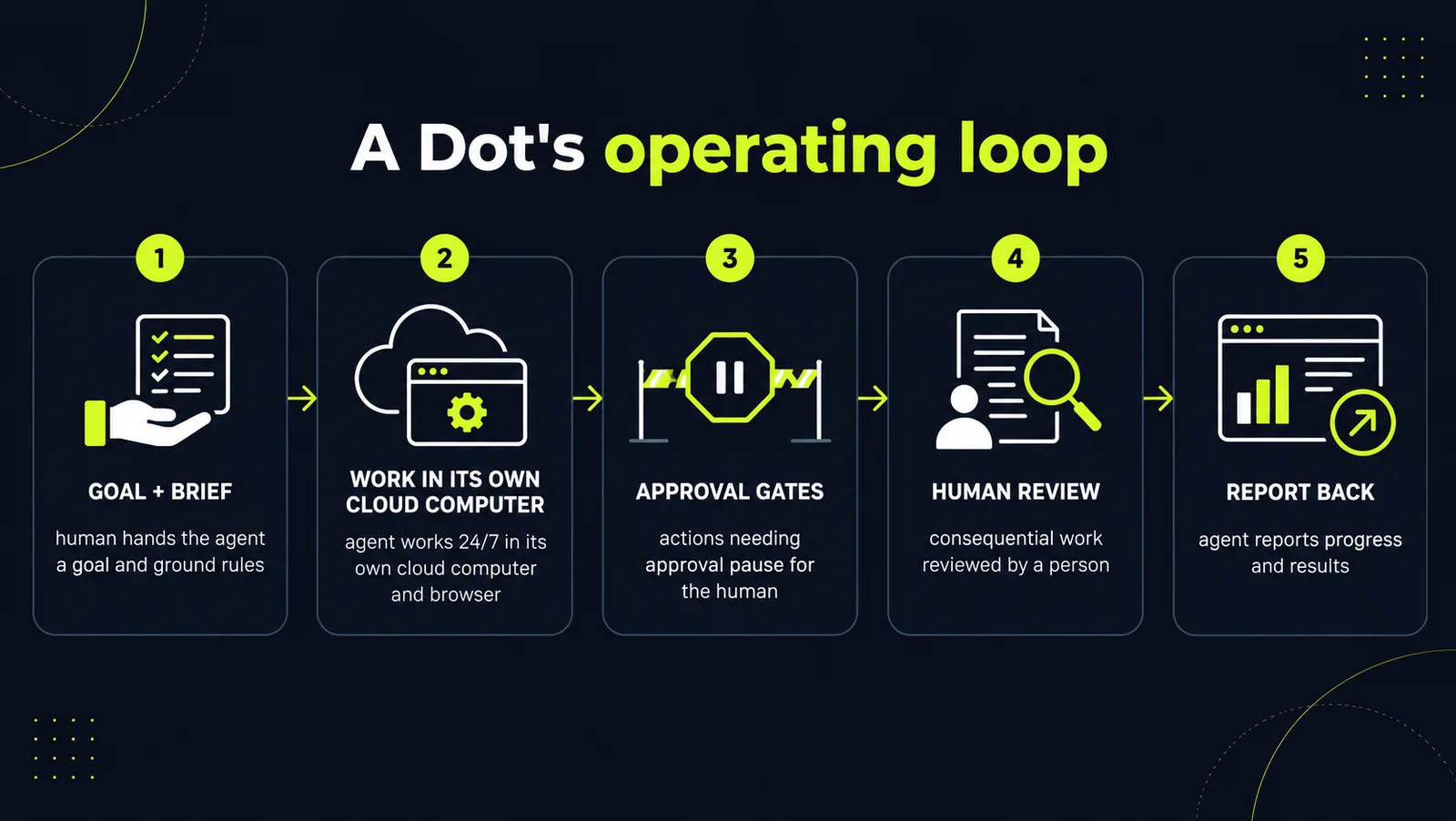
A Dot is not another chat thread. OpenAI says each Dot gets its own cloud computer and browser, works through apps the user connects — more than 4,000 apps through its plugin ecosystem — and keeps context over time. You reach a Dot through ChatGPT on desktop, web, and mobile, and through Slack and Teams, with the same Dot experience across supported interfaces. (OpenAI dots announced at DevDay 2026: How these always-on AI agents will handle tasks on your behalf — Digit.in)
The demonstrations focused on operational workflows rather than consumer showcases: triage recurring bug reports and feature requests, prepare pull requests, manage planning cycles, migrate an application off a retiring API. The product shifts the interaction model from one-off requests toward longer-running delegated tasks. (OpenAI DevDay Keynote TLDR — Substack)
Two details deserve your attention. First, "proactive research" mode: in the background, a Dot can look through connected apps using read-only access to find information that may be useful — it cannot send messages or change content in this mode. The read-only mode provides a narrower permission model for early experimentation, and it is the posture you should start in. Second, OpenAI is testing specialist dots for businesses — agents aimed at workflows involving company systems, such as procurement, invoice processing, customer support, and commercial contracting. Those workflows are common candidates for automation because they involve repeatable processes and structured data — and they are where agent deployments get tested against reality. (OpenAI dots announced at DevDay 2026: How these always-on AI agents will handle tasks on your behalf — Digit.in)
On availability, according to reporting on the announcement: Dots are rolling out to Pro and Business Premium users in eligible markets, with Enterprise, Edu, and Healthcare access as a beta that a workspace administrator enables. The first Dot is included at no additional cost on Pro and Business Premium, and conversations with a Dot do not count toward ChatGPT usage limits. (OpenAI dots announced at DevDay 2026: How these always-on AI agents will handle tasks on your behalf — Digit.in)
The detail that matters: your approval gates
OpenAI's own guidance is unusually blunt. Users can set custom rules, monitor progress, and decide which actions need approval — and certain sensitive actions, OpenAI names changing a password, will always require the user. And in OpenAI's own words: "Dots can still make mistakes, so always review consequential work." (OpenAI dots announced at DevDay 2026: How these always-on AI agents will handle tasks on your behalf — Digit.in)
The statement highlights the need for review controls when agents perform consequential actions. A Dot with its own computer, browser, and thousands of connected apps is a background process with production access. Treat an agent with system access as a production service that requires ownership, permissions, and monitoring: named owner, an approved action list, reviewed logs.
Where always-on agents fail
OpenAI's "dots can still make mistakes" is doing more work than it looks. The failure modes of background agents are specific and worth naming: a wrong action executed while nobody is watching; an ambiguous instruction interpreted as a rule; tool calls looping and burning usage; silent failures where a task quietly stops completing; stale context driving decisions on outdated information.
That list dictates your selection criteria. Good first candidates: repetitive, measurable, reversible, low-risk — report generation, triage, follow-ups. Poor candidates: ambiguous decisions, regulatory judgments, irreversible actions. Before deployment, define agent ownership, access boundaries, and review procedures — and settle who owns the brief when the person who wrote it changes roles.
The pricing model lowers the barrier for early experimentation
The first Dot ships included with Pro and Business Premium at no additional cost, and Dot conversations don't consume usage limits. That is a wedge: embed always-on agents in recurring workflows first, price the fleet later. The subscription is the cheapest line on the bill — integration engineering, data cleanup, workflow redesign, security review, and monitoring will dwarf it. Budget the deployment, not just the seat.
DevDay's other announcements point the same way. GPT-6.1 Sol targets near-Astra intelligence for coding, computer use, and professional workflows at one-fifth of Astra's standard token prices. A new $500/month Pro 500 tier offers 25 times the Plus allowance with access to Astra Ultrafast — a premium speed tier reaching 300 tokens per second in Codex. (OpenAI DevDay 2026: 20+ AI Tools, GPT-6.1 Sol, Dots — Analytics Insight) The trend is toward lower-cost access to models capable of handling more complex workflows, with latency as the premium feature. Lower inference costs may make some always-running workloads cheaper to run — and competitors will follow. Keep the integration layer vendor-neutral.
What this means for your business
1. Inventory your recurring work this week. Bug-report triage, report generation, follow-ups, invoice chasing, status compilation — list the tasks that stall waiting for someone's attention. No new product is needed to make the list.
2. Write the brief before connecting the tools. Objective, allowed actions, forbidden actions, required approvals, success criteria. Start with read-only access — OpenAI's "proactive research" mode is effectively that posture — until the agent has earned write access.
3. Name the operating model. Who reviews the outputs? Who maintains the agent's instructions when processes change? Who handles exceptions, and who audits the logs? An agent that changes tasks also changes roles — assign them.
4. Instrument the baseline now. Cycle time, hours spent, error rates, escalation frequency — measure before the agent touches anything. Agent work that is not measured against a baseline is a demo, not an improvement.
Always-on agent workflows are moving from prototypes into commercial products. The organizations that benefit most will likely be those that define clear workflows, permissions, and success metrics before the agent gets its keys.
Want a grounded map of which of your workflows an always-on agent can actually own — and which ones it can't? Get a free AI audit and we'll work it through with you.
Sources
- OpenAI DevDay 2026 brings new AI agents, developer toolstechgig.com
- OpenAI dots announced at DevDay 2026: How these always-on AI agents will handle tasks on your behalfdigit.in
- OpenAI DevDay 2026: 20+ AI Tools, GPT-6.1 Sol, Dotsanalyticsinsight.net
- OpenAI DevDay Keynote TLDRsifuyik.substack.com
Want to know what this means for your stack? A free AI audit maps your workflows and shows where automation pays off — in your numbers, not ours.