

Most operations teams have a process that lives in one person's head: the monthly report, the weekly rollup, the recurring check only one analyst knows how to run. When that person is away, a teammate rebuilds the work from scratch and the output can look different every time. AWS addressed exactly that failure in its November 20 update to AWS Quick, its AI workspace for work. You can now build, run, and refine AWS Quick flows entirely in chat — describe the process the way you would explain it to a new employee, and Quick builds the flow, per New in AWS Quick: More capable flows, an updated web experience, and agents that work together. The same release adds multi-agent orchestration, a web app that keeps work running after the tab closes, two new connectors, and prompt guardrails.
Build the flow in the conversation where you describe it
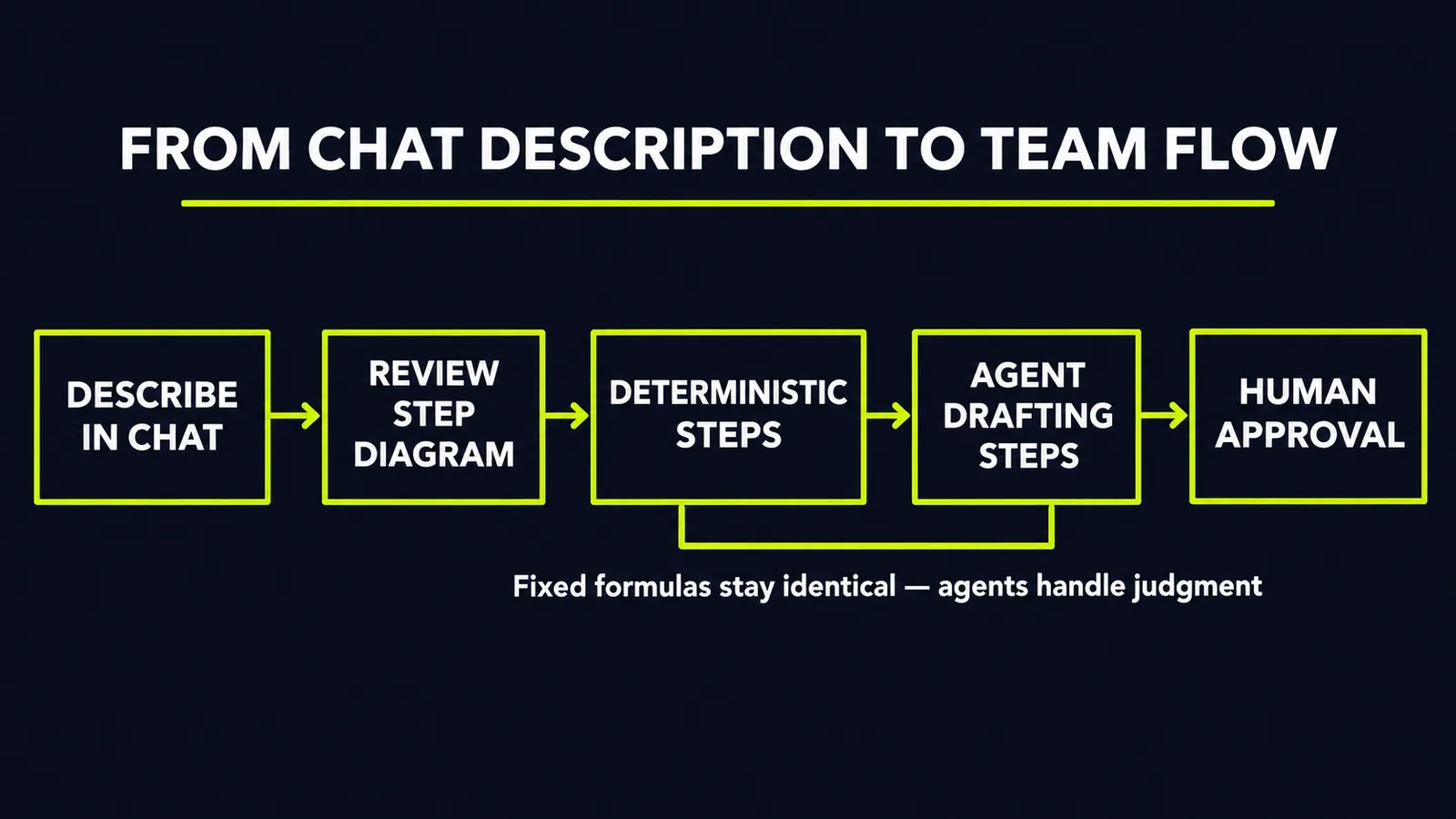
Quick Flows already existed as a way to automate and standardize business processes. What changed is the authoring surface. The process owner describes the work in chat, Quick constructs a flow that orchestrates agents, skills, tools, and data, and a diagram beside the conversation shows each step so the author can confirm it matches how the work really happens, per AWS Quick adds chat-built flows, web app update and multi-agent orchestration. The author tests and refines the flow in the same conversation, then publishes it for the team.
AWS illustrates it with a fictional finance example. A planning manager describes her monthly cost and margin report once: pull last month's results from the team's dashboard, work through several areas at the same time, compare each against the plan in a budget spreadsheet, flag the ones that moved significantly, and draft commentary. The flow then drafts a spreadsheet summary and a report email for her review and notifies the team that the draft is ready, per New in AWS Quick: More capable flows, an updated web experience, and agents that work together. A colleague can later run the published flow from the desktop app, using a file saved on that person's computer — and a new team member runs the same flow at their first month-end and produces the report the same way.
The customer evidence AWS offers is one company's account, not a benchmark. AWS quotes the head of data at a payments provider saying nearly four times as many people now work with data each month without growing the team, and that a single use case saves 80 hours of work per month, per AWS Quick adds chat-built flows, web app update and multi-agent orchestration. Treat it as a directional claim from one deployment; the finance walkthrough itself is explicitly fictional.
Deterministic steps are the part that makes it auditable
The detail that separates this from a chat-to-workflow gimmick is the mix of step types. Flows can now combine deterministic steps — fixed calculations and checks — with agent steps that draft and analyze, and they support longer-running processes and larger data volumes than earlier versions, per AWS Quick Flows: Chat-Built Processes and Multi-Agent. In the finance example, the comparisons against plan use set formulas, so the numbers are calculated the same way on every run, while the agent handles the commentary draft.
That split is the right default for business automation. Anything that must be identical every time — a total, a threshold check, a reconciliation — belongs in a deterministic step where it can be verified. Anything that requires judgment over unstructured input — drafting, summarizing, classifying — is where an agent belongs. Teams that let a model do the arithmetic get plausible numbers; teams that fix the arithmetic and let the model write around it get numbers they can defend.
One request, several agents, one attributed answer
The second capability addresses a real limit of single-agent designs. With multi-agent orchestration, the agent you ask can bring in several specialized agents at once, each working on the part it knows best, and Quick combines their work into one response, per New in AWS Quick: More capable flows, an updated web experience, and agents that work together. Each agent keeps its own instructions, knowledge, and context, so the people who know that work best build and maintain their own agent instead of one team maintaining a monolith.
AWS's example is a question about why shipping costs rose in one area, answered by a forecasting agent built on planning data working alongside a procurement agent built on vendor contracts, per AWS Quick Turns a Described Process Into a Team-Wide Agent Flow. The response shows what each agent contributed, which makes a combined answer auditable rather than a black box. One open question: the announcement gives no benchmarks for the longer flows and does not say how conflicting answers from different agents are resolved, per AWS Quick adds chat-built flows, web app update and multi-agent orchestration. Plan on a human making that call.
The web app keeps working after you close the tab
The updated web app is the operating surface for all of this. The home screen surfaces the items that need your attention and a daily briefing as soon as you sign in, agents and skills from the desktop app appear in the web app, and work keeps running after you close the browser — agents waiting on you collect in Mission Control, per New in AWS Quick: More capable flows, an updated web experience, and agents that work together.
Two new connectors extend what flows can read, both built on Model Context Protocol servers. The Meta ads connector lets teams create, manage, and analyze campaigns in natural language — with Quick asking permission before it creates a campaign, changes a budget, or takes any other write action. The Amplitude connector lets teams ask about product usage, behavior, and conversion in natural language, per AWS Quick adds chat-built flows, web app update and multi-agent orchestration. Connectors respect each person's existing permissions, and administrators choose which connectors a team can add. Skills — reusable instructions that teach Quick to do a task your way — are now also manageable in the web app, per the announcement.
Guardrails arrive in the same release
AWS paired the authoring features with administrator controls. Guardrails for prompts, in preview, let administrators filter content, block denied topics and words, detect prompt attacks, and protect selected types of personal information in user prompts; a policy can be tested in detect-only mode before enforcement, then applied to individual users, identity provider groups, or the whole account, per AWS Quick adds chat-built flows, web app update and multi-agent orchestration. Administrators can also assign permissions and usage limits by group — for example, capping how many agent hours a group can use — and control which types of data sources people can create, update, or share. AWS says these controls are available to Professional and Enterprise plan customers, and gives no pricing beyond a free three-month trial offer with up to ten invited teammates at no cost, per the same coverage.
What this means for your business
1. Start with the process that lives in one person's head. Pick the recurring report or check that breaks when its owner is away. Have that owner describe it in chat, run the flow in parallel with the manual version for one cycle, and compare outputs before you trust it.
2. Split every flow into fixed steps and judgment steps. Calculations, thresholds, and reconciliations go in deterministic steps with set formulas. Drafting, summarizing, and analysis go to agents. If a step's output must be identical every run, it does not belong to a model.
3. Keep a human approval step before anything leaves the team. The pattern in AWS's own example is draft, review, approve, send. Do not remove that step to save minutes; it is what makes the automation safe to publish.
4. Give each specialized agent one owner and one domain. Multi-agent orchestration works because each agent keeps its own instructions and context. A combined answer is only auditable if each contribution has an owner — and name a backup owner for every published flow, so it does not end up back in one person's head.
5. Turn the guardrails on in detect-only mode first. Run prompt policies in observation mode, read what they would have blocked, fix the wording, then enforce. Set group-level usage limits before flows spread beyond the team that built them.
6. Measure one flow before you scale to twenty. Track the hours the first published flow actually saves and the errors it makes across a full cycle. The 80-hours-a-month figure is one customer's account; your number is the one that justifies the rollout.
The direction of this release is clear: the person who owns a process can now encode it, publish it, and let the whole team run it the same way every time. If you want to find which of your own processes are ready for that treatment — and which need their steps fixed first — start with our free AI audit. We will map the work that lives in one person's head and show you what to automate first.
Sources
- https://syncai.news/article/new-in-aws-quick-more-capable-flows-an-updated-web-experience-and-agents-that-wo-15d139syncai.news
- https://letsdatascience.com/news/aws-quick-adds-chat-built-flows-web-app-update-and-multi-age-28346a73letsdatascience.com
- https://www.explainx.ai/blog/aws-quick-flows-multi-agent-web-app-meta-amplitude-november-2026explainx.ai
- https://automater.ai/news/aws-quick-flows-chat-built-team-agent-flows-multi-agent-orchestration/automater.ai
- https://completeaitraining.com/news/aws-quick-adds-flows-you-build-in-chat-multi-agent/completeaitraining.com
Want to know what this means for your stack? A free AI audit maps your workflows and shows where automation pays off — in your numbers, not ours.