

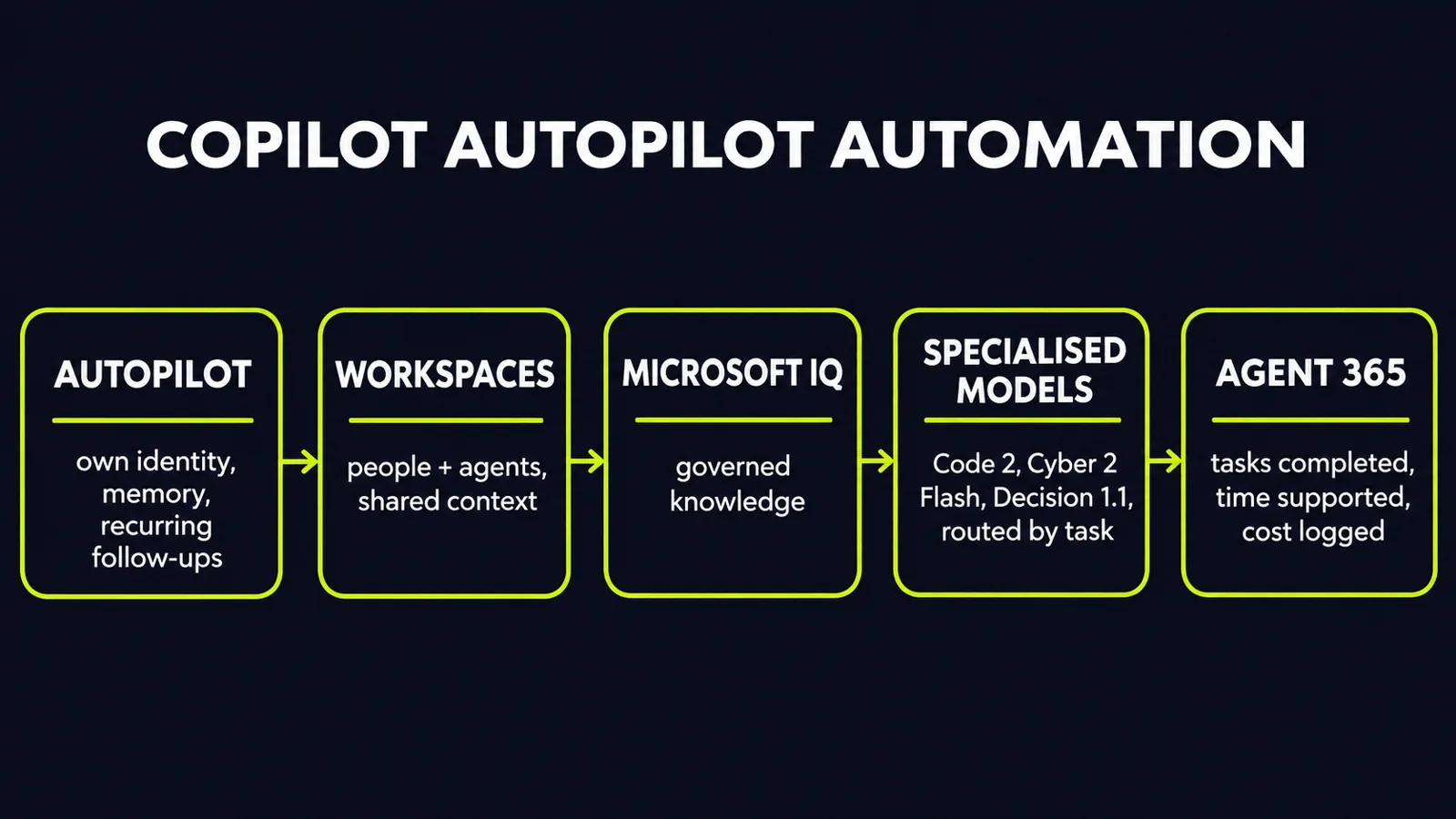
Microsoft used Ignite 2026 on November 17 to move Copilot past chat. The headline is not a single model. It is a working pattern: a persistent agent called Autopilot that carries recurring work forward, shared Workspaces where people and agents work on the same project, a context layer called Microsoft IQ, and seven specialised models underneath — all wrapped in Agent 365 governance, per Microsoft Ignite 2026: Empowering Human Ambition, Intelligence, and Trust. That is a different claim from a better answer in a chat window. The test is whether work moves without you prompting every step.
What Autopilot actually does
Autopilot is a persistent personal agent with its own memory, tools and identity inside an organisation's Microsoft environment, per Microsoft Ignite 2026: Copilot Autopilot, Today & Fusion. It can follow up on conversations, handle recurring work and continue projects without waiting for a prompt at every step, per the same source. Microsoft's own summary puts it in similar terms: Autopilot can take on recurring tasks and support projects over extended periods without requiring a new prompt at every step, per Microsoft Ignite 2026: Empowering Human Ambition, Intelligence, and Trust.
Two details matter for operations. Colleagues can mention an Autopilot in a team channel to request information or supported actions, per Microsoft Ignite 2026: Copilot Autopilot, Today & Fusion. And its actions are tied to its own agent identity, safety-checked and visible to administrators, so a team can distinguish what a person did from what their assistant did, per the same source. Autopilot is starting to roll out through Frontier, Microsoft's early-access programme, per the same source. Plan for a pilot, not a company-wide switch today.
Alongside Autopilot, Today — entering private preview through Frontier, per the same source — pulls information from email, calendars, chats and meetings, shows what needs attention and prepares next steps — including drafts and proposed scheduling changes — for review, per Microsoft Ignite 2026: Copilot Autopilot, Today & Fusion. The distinction is useful: Today prepares the next step, Autopilot owns an ongoing responsibility.
Workspaces, IQ and the context problem
Most agent pilots fail on context, not on model quality. People re-explain the same rules, documents live in different places, and the agent has no shared record of what the team already decided.
Copilot Workspaces are Microsoft's answer on the collaboration side: shared environments for employees and AI agents, per Microsoft Ignite 2026: Empowering Human Ambition, Intelligence, and Trust. Microsoft IQ is the answer on the knowledge side. It helps organisations structure, manage and make their knowledge available to applications and agents, with business plugins that let teams reuse company-specific knowledge across teams and applications, per the same source. Foundry adds continuous improvement based on real usage signals, optimising agents for quality, speed and cost, per the same source. Neither feature is glamorous. Both decide whether an agent is useful after week two.
Seven specialised models, not one general model
Microsoft unveiled seven new models under its MAI family, targeting coding, cybersecurity, image editing, speech, transcription and automated decision-making, per Microsoft takes on Claude with coding models costing 95% less. The lineup includes MAI Cyber 2 Flash, MAI Code 2, MAI Code 2 Flash, MAI Image 2.7, MAI Realtime 1, Dragon Copilot Transcribe and Decision 1.1, per the same source.
For engineering teams, Code 2 and Code 2 Flash are generally available in GitHub Copilot's model picker and Copilot Fusion, and also available in Foundry, per AI News Nov 18, 2026: GPT-6.2 Astra & Microsoft Code 2 | SXF Brief. Microsoft said Code 2 delivers 98% of GPT-6.1 Sol's coding performance at about 40% of the price, per Microsoft takes on Claude with coding models costing 95% less. Those are Microsoft's own figures on its chosen comparisons — a reason to run your own repository tasks, not a buying decision.
Fusion, GitHub Copilot's model-coordination layer, shows why routing matters. It selects and coordinates models for a task, can check a draft before escalating to a stronger model, or have several models critique a response before revision, per Microsoft Ignite 2026: Copilot Autopilot, Today & Fusion. Decision 1.1 does similar routing work within applications, directing tasks to larger models only when needed, per Microsoft takes on Claude with coding models costing 95% less. The pattern is consistent: use a cheap, fast model for routine decisions and reserve the expensive model for the hard step.
Governance is part of the product, not an add-on
"We already have 50 million agents in Agent 365," Microsoft's chief executive said in the keynote, per Microsoft Ignite 2026: Microsoft pushes beyond AI.... Registered is not the same as active — treat the figure as scale of experimentation, not proof of value. What matters is the control layer around it. Agent 365 Business Analytics gives leaders visibility into AI spending, adoption and estimated business value, and helps them track which tasks were completed and what costs were incurred, per Microsoft Ignite 2026: Empowering Human Ambition, Intelligence, and Trust.
Microsoft Perception, now generally available, connects specialised agents to identify security gaps, defend against threats and remediate vulnerabilities, per the same source. Cyber 2 Flash and Perception target security-agent workflows together, per AI News Nov 18, 2026: GPT-6.2 Astra & Microsoft Code 2 | SXF Brief. Keep humans in control of critical decisions in that design — a boundary worth copying in any agent deployment, whether or not you use this stack.
What this means for your business
1. Pilot Autopilot on one recurring responsibility, not on everything. Pick work that stalls between prompts: follow-ups, status chasing, a weekly coordination cycle. Give it a named owner, a clear completion rule and a two-week review. Set a baseline first — time and error rate on that task today — or you will have no way to prove a saving. If it needs constant correction, you have learned the limit cheaply.
2. Fix context before you add agents. Workspaces and IQ only help if your source documents, permissions and decision records are in order. Audit who can access what first. An agent inherits the mess it can read.
3. Give every agent an identity and a log. Autopilot's separate identity and administrator visibility are the right default. Require the same from any vendor: who owns the agent, what can it access, what did it do, and how do you disable it? Define approval thresholds too: which actions run unattended, and which need human sign-off before they leave the team.
4. Route models by task and measure cost per finished task. Use Flash-class models for explanations and routine fixes, stronger models for multi-file changes, and a decision model for routing itself. Compare merged work and reviewer time, not token price alone.
5. Track completed tasks, time supported and cost. Those are the three numbers that decide whether an agent programme continues. Token counts alone will not defend a budget.
6. Respect the availability line. Autopilot is in early access and Today is in private preview, while Code 2, Decision 1.1 and Perception are generally available. Build production plans on what is generally available today and treat the rest as a timed pilot.
Ignite 2026 does not settle whether autonomous Copilot will work in your operation. It does settle the direction: agents with identity, shared context, specialised models and a cost ledger. Teams that prepare those four pieces now will be ready to evaluate Autopilot on evidence, not on a keynote.
Ready to find where automation would cut cost or cycle time in your operation? Get a free AI audit — we'll map your highest-leverage automation opportunities in one session.
Sources
- https://news.microsoft.com/source/emea/2026/11/microsoft-ignite-2026-empowering-human-ambition-intelligence-and-trust/news.microsoft.com
- https://www.theneuron.ai/news/microsoft-ignite-2026-copilot-autopilot-today-fusion/theneuron.ai
- https://interestingengineering.com/ai-robotics/microsoft-seven-mai-models-launchinterestingengineering.com
- https://sxf.si/brief/sxf.si
- https://www.technologyrecord.com/article/Microsoft-Ignite-2026-Microsoft-pushes-beyond-AI-assistants-towards-enterprise-wide-agentic-workplacestechnologyrecord.com
Want to know what this means for your stack? A free AI audit maps your workflows and shows where automation pays off — in your numbers, not ours.