
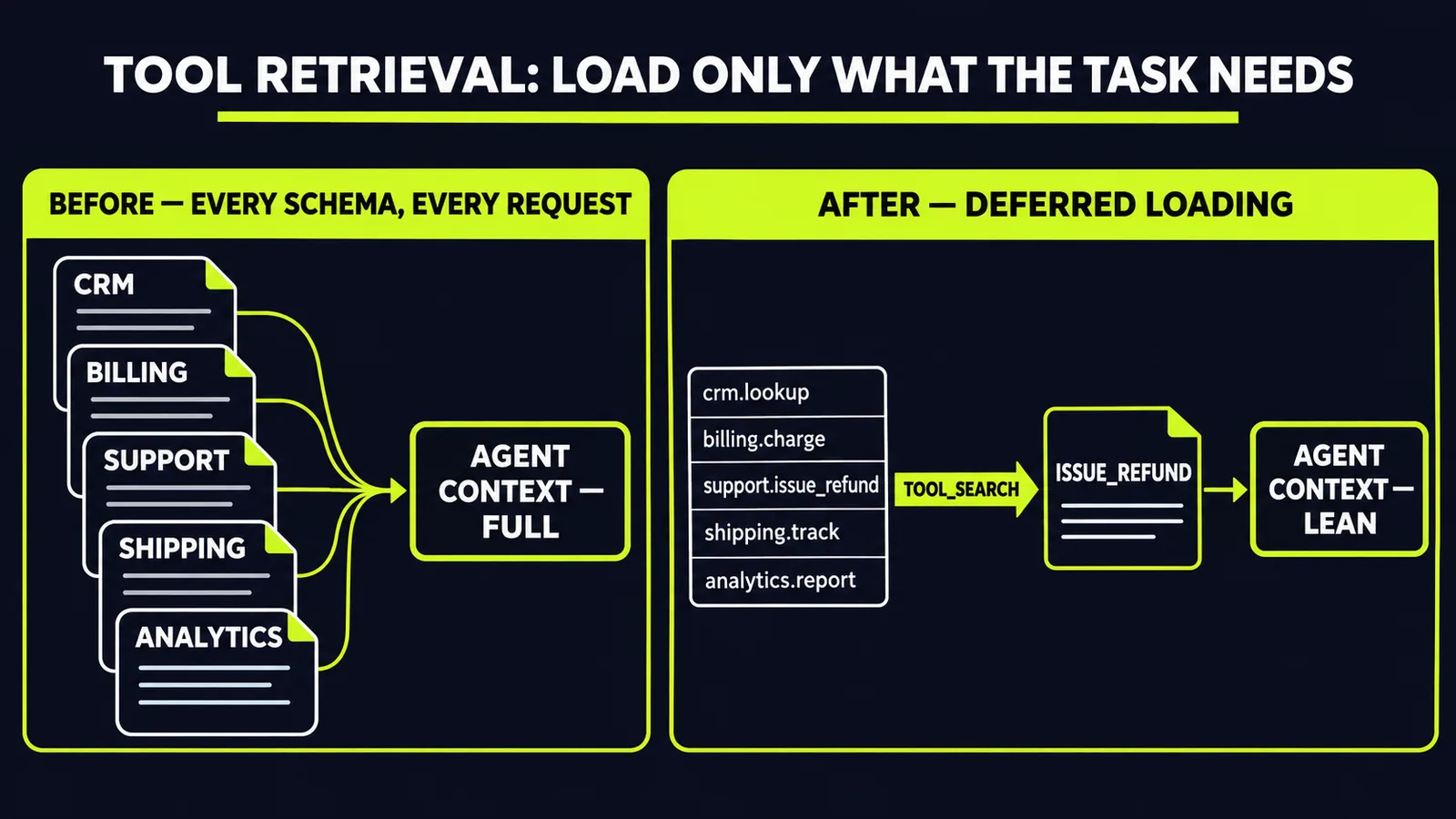
Every tool you connect to an agent adds its full parameter schema to every request. Connect it to your CRM, your billing system, your support desk, your internal APIs — and each connection ships its schema on every single call, whether the task needs it or not. Google named the cost plainly: sending every schema inflates input tokens, adds latency, and lowers tool-selection accuracy as the candidate list grows, per Gemini API tool retrieval for efficient agent scaling. On November 19, Google put a mitigation into preview: Tool Retrieval in the Gemini Interactions API. One honesty note up front: Google published no savings figure, latency number, or accuracy benchmark with the launch — the case below rests on the mechanism, not on vendor metrics. The same day, it put the consumer version of the same idea on the desktop, adding background computer use to the Gemini app for Mac, per Automate Mac tasks with Gemini computer use. One release is about agents that scale. The other is about agents that operate real software. Together they describe where production agents are heading.
How Tool Retrieval works
The mechanism is deliberately small. You add a `tool_search` tool to your request and set `defer_loading: true` on the tools you want to hold back, per Gemini API tool retrieval for efficient agent scaling. The model still sees the name and description of every deferred tool, so it knows what exists. The parameter schemas stay out of context. When the model needs a tool, it asks for it by name, the API loads the full schema, and the model calls the function — all inside the same request.
Google's worked example is a support agent handling a damaged order. Inside one API call, the model searches for an `issue_refund` function, the API loads its schema, and the model emits the call with the order ID and amount, per the same announcement. All three steps — the search call, the search result, and the function call — appear in `interaction.steps`, so you can inspect exactly which tools the model considered when a call goes wrong, per Gemini's Tool Retrieval: Stop Paying for Tools Your Agent Never Calls.
Two design details matter for production builds. There is no index to build or host: the search runs on Google's side, so the only code changes are the new tool and the flag, per Gemini API tool retrieval for efficient agent scaling. And deferred schemas stay out of the start of the prompt, keeping the cached prefix stable from turn to turn — so Tool Retrieval works with prefix caching instead of fighting it, per the same source. Independent coverage estimates each idle tool at roughly a one-line entry — about 26 tokens by one outlet's count, varying with name and description length — per Google shrinks idle tools in Gemini agents to about 26 tokens each. Treat that as an estimate, not a Google figure.
The MCP angle is the real story
Function deferral alone would be a useful optimisation. The bigger move is what happens with remote MCP servers. Set `defer_loading: true` on an `mcp_server` tool and every tool that server exposes loads on demand, so you can connect a large server without listing its tools one by one, per Gemini API tool retrieval for efficient agent scaling. That removes one of the main reasons teams avoid wiring large MCP catalogues into agents at all, per Gemini's Tool Retrieval: Stop Paying for Tools Your Agent Never Calls.
If you run your own registry, there is a second mode. Declare `tool_search` with client execution and define your own search parameters, and your application runs the lookup instead, per Gemini API tool retrieval for efficient agent scaling. That enables per-user permission filtering, and it lets you expose new tools mid-conversation when a user connects an integration. The trade-off is one extra round trip per search, per the same source.
One cost nobody should skip: deferral moves the burden onto your tool descriptions. The model finds deferred tools by name and description alone, so vague descriptions become retrieval failures. Rewriting and testing those descriptions is the real migration work — budget for it.
Pricing is simple. Tool Retrieval carries no separate charge; tokens are billed at standard model rates, turning on `tool_search` adds a small fixed block of input tokens, and each loaded schema is billed as input for the rest of the conversation, per Gemini API tool retrieval for efficient agent scaling. You save when the schemas you never load outweigh the ones you do, per Gemini's Tool Retrieval: Stop Paying for Tools Your Agent Never Calls. Measure it on your own traffic before you promise anyone a number. The feature works with Gemini 3.6 and later models, including all Gemini 4 models, and it is in preview, so pin your model version, per Gemini API Tool Retrieval Loads Agent Tools On Demand.
The same week, agents learned to use the desktop
Tool Retrieval fixes how agents reach tools through APIs. The Mac release tackles the software that has no API at all. Computer use in the Gemini app for Mac completes multi-step tasks across local files, desktop apps, and the web — handling the clicking, typing, menus, and forms — inside an isolated background window with a live preview, while your own screen and cursor stay free, per Automate Mac tasks with Gemini computer use. You choose which apps it can access, you can pause it at any time, and key actions need your approval, per the same announcement. Google's examples are operational, not decorative: extracting data from local PDFs to fill in shipping quotes, and pulling metrics from live dashboards to build a presentation, per the same source. It is rolling out for Google AI Plus, Pro, and Ultra subscribers on Apple Silicon machines running macOS Sequoia 15 or later, per Google's Gemini Can Now Control Apps on Your Mac.
Read the two launches together and the pattern is clear. The bottleneck for agents is no longer the model's reasoning. It is the plumbing: how much context the tool catalogue burns, and how much of your software stack an agent can actually reach.
What this means for your business
1. Audit your schema overhead before your next model upgrade. Count how many tokens the unused schemas consume on a typical request, and multiply by your request volume. That is the budget Tool Retrieval is designed to hand back — a measurable figure from your own logs, not a vendor promise.
2. Defer the long tail, keep the hot path loaded. Google's own guidance is to keep your most-used tools loaded up front and defer the rest, per Gemini API tool retrieval for efficient agent scaling. A support agent needs its top five tools instantly and its fiftieth tool eventually. Design the split deliberately; do not defer everything by default.
3. Revisit the MCP catalogues you shelved for cost. The old objection — wiring in a big server floods the prompt — no longer holds on this stack. Reconnect those integrations behind deferred loading, with the `interaction.steps` trace as your debugging surface.
4. Pilot computer use on one ugly, API-less workflow — with an owner and a deadline. Every operation has one: the legacy form, the vendor portal, the spreadsheet ritual. A background agent that works in an isolated window, with per-app permissions and approval gates, is the first version of desktop automation a cautious team can actually trial. Assign one owner, give the pilot two weeks, pick the workflow with the most clicks and the least judgement, and judge it on time saved per completed run — measured before and after, not impressions.
5. Respect the preview label. Tool Retrieval can change before general availability. Pin model versions, add regression tests for tool selection, and monitor the response-step shape if you build tooling around it, per Gemini API Tool Retrieval Loads Agent Tools On Demand. Preview features belong in pilots with exit ramps, not in the critical path on day one.
The teams that win with agents will not be the ones with the longest tool lists. They will be the ones whose agents load the right tool at the right moment and keep the token bill proportional to the work actually done. If you want that arithmetic run on your own stack, start with our free AI audit — we will map where your agents are paying for tools they never call, and what to fix first.
Sources
- https://blog.google/innovation-and-ai/technology/developers-tools/gemini-api-tool-retrieval/blog.google
- https://blog.google/innovation-and-ai/products/gemini-app/computer-use-mac/blog.google
- https://dev.to/ton_thnhthy_ba110cce85/geminis-tool-retrieval-stop-paying-for-tools-your-agent-never-calls-3kn5dev.to
- https://ppc.land/google-shrinks-idle-tools-in-gemini-agents-to-about-26-tokens-each/ppc.land
- https://www.talkandroid.com/536023-gemini-api-tool-retrieval-preview/talkandroid.com
- https://www.macrumors.com/2026/11/19/google-gemini-mac-app-control/macrumors.com
Want to know what this means for your stack? A free AI audit maps your workflows and shows where automation pays off — in your numbers, not ours.