

Most computer-use agents work from screenshots. They guess which pixels form a button, click, and hope the layout did not move. Vercel Labs has shipped a different answer. agent-desktop first reached version 1.0.0 on October 28, with version 1.0.2 published on October 30, as an open-source tool that lets an AI agent read and operate desktop applications through the operating system's accessibility tree — the structured list of buttons, fields and menus an app already exposes — instead of guessing from screenshots, per Vercel agent-desktop: AI Desktop Automation Using Windows UI Automation and Vercel's agent-desktop Gives Agents Computer Use. It is not a new model. It provides a model-agnostic interface for desktop interaction, and its snapshot, target-validation and verification pattern is worth copying even if you never install it.
What actually shipped
agent-desktop is a command-line tool and a C library, written in Rust and licensed under Apache-2.0. It bundles no language model, has no graphical interface, and is not an agent itself: each command prints one JSON envelope and exits, leaving the reasoning loop with whatever agent you connect, per Vercel Labs ships agent-desktop for coding agents. It was introduced on October 31 as "agent-browser, for your whole computer" — the same accessibility-tree approach Vercel already used for browser automation, extended to the full desktop, per the same report.
It runs across macOS, Windows and Linux, on both x64 and ARM64 hardware, and installs with a single npm command, per Vercel's agent-desktop Gives Agents Computer Use. Each platform build talks to that system's own accessibility API, so the tool reads structure the operating system already maintains instead of maintaining a visual model of its own, per Vercel Labs ships agent-desktop for coding agents. A November 1 roundup makes the same core point: the project is designed to make computer interaction more reliable than approaches that depend entirely on recognising and clicking screen pixels, per 5 Major AI News Updates You Should Know on November 1, 2026: Google AI in Space, OpenAI ChatGPT Update and Anthropic Safety Breakthrough.
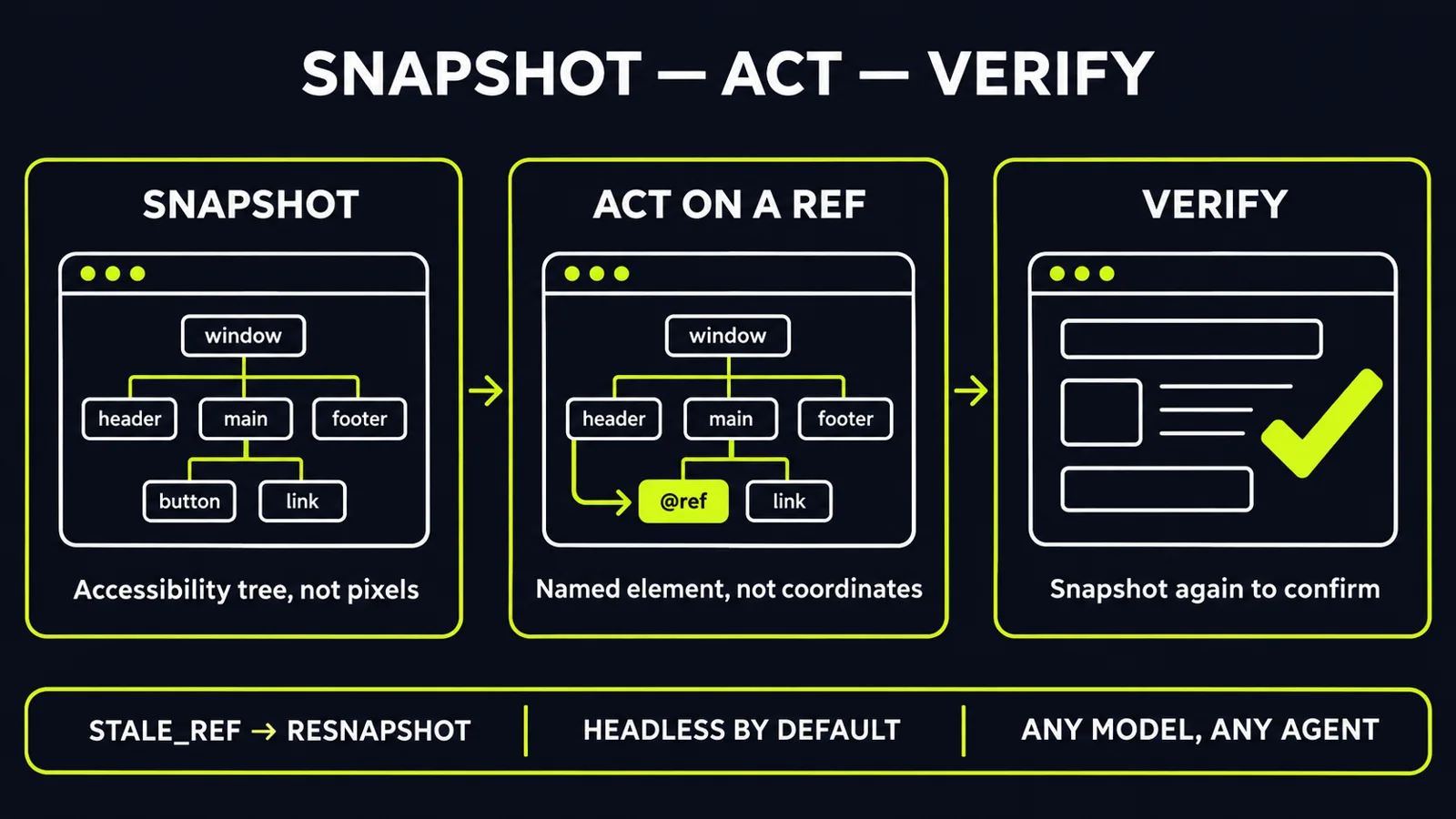
Refs, not pixels: the observe, act, verify loop
The workflow is deliberately small. An agent asks for a snapshot of an app. agent-desktop returns JSON in which every element the agent can act on carries a reference — a ref tied to that specific snapshot. The agent acts on the ref, then snapshots again to confirm the result, per Vercel agent-desktop: AI Desktop Automation Using Windows UI Automation. There is no pixel matching anywhere in that loop.
Refs are scoped and validated. A bare ref without its snapshot identifier is rejected as malformed. If a target can no longer be resolved safely — because the interface changed, or because more than one element matches — the tool can return a stale-ref or ambiguous-target error, and each error carries guidance on whether a retry is safe; the correct response is a fresh snapshot, not a blind retry, per Vercel Labs ships agent-desktop for coding agents. That validation design aims to prevent actions against stale or ambiguous targets. It does not guarantee every agent action will be correct — the calling agent still chooses the target — but for business automation, a tool that can refuse is safer than one that always clicks.
The tool is headless by default: ref actions go through the accessibility API without moving the pointer or taking focus, which supports background interaction while a person keeps using the same machine, subject to application and platform behaviour; physical input exists only when explicitly enabled, per Vercel's agent-desktop Gives Agents Computer Use. The CLI exposes 60 command names, with 56 operational. Four key- and mouse-button hold-and-release commands remain disabled until the tool can guarantee a safe release, per Vercel Labs ships agent-desktop for coding agents.
The token argument — and its limits
Screenshot-based computer use is expensive because every look at the screen costs model tokens. agent-desktop offers skeleton snapshots to cut that cost: inspect a dense window's outline first, then drill into only the region the task needs. Its builder reports that approach cutting one mapping app from 3,811 tokens per look to 273, and a simulated 52-step task from 198,000 tokens to 31,000, per Vercel's agent-desktop Gives Agents Computer Use. Treat those numbers correctly: both figures are simulated, reported by the builder, and not an independent benchmark — a detailed review flags exactly that caveat, per Vercel agent-desktop: AI Desktop Automation Using Windows UI Automation.
The limits define where it fits. It only works on apps that expose a usable accessibility tree; custom-drawn interfaces that publish no structure stay out of reach. It does not automate web pages — a companion browser tool remains the route for those, though it can hand over a debugging connection for app-embedded web content, per Vercel Labs ships agent-desktop for coding agents. And the project is young, at version 1.0.x: one review notes a proposed fix for a crash at command exit in an earlier version, and advises testing on your own builds first, per Vercel agent-desktop: AI Desktop Automation Using Windows UI Automation.
What this means for your business
1. Audit your desktop bottleneck before buying more agents — and check for an API first. List the workflows that still force a person to copy data between desktop apps. If a documented API exists for that step, evaluate it first: UI automation always carries interface and session dependencies an API does not. Desktop automation earns its keep where no API exists. Then check whether the target app exposes sufficient accessibility metadata. If it does not, agent-desktop may be unsuitable; visual automation remains a separate option, requiring its own reliability testing.
2. Require a verify step in every desktop workflow. Copy the pattern, whatever tool you choose: snapshot, act on an identified element, snapshot again, and stop on a stale or ambiguous target instead of retrying blindly. Build that refusal behaviour into your acceptance tests. An automation that halts and reports is an asset; one that guesses is a liability.
3. Run it contained, and treat snapshots as sensitive data. A snapshot can contain whatever the desktop was showing, and clipboard reads and screenshots carry the same risk — the project's own documentation warns to keep them out of public logs, per Vercel's agent-desktop Gives Agents Computer Use. Start in a test environment, on an account scoped to the task, without elevated privileges unless a step genuinely requires them. Check the platform prerequisites before the pilot, too: an accessibility permission grant on one system, integrity-level boundaries on another, and a running accessibility bus in a graphical session on the third, per Vercel Labs ships agent-desktop for coding agents. Review what gets logged before any wider rollout.
4. Measure total cost per completed task, not cost per look. The token claims are promising but not independently verified. Pilot on one real workflow — data entry between two desktop apps is a good test — and measure tokens, retries, completion rate, refusal rate, monitoring and human review time against your current baseline. A simple decision rule helps: API available, evaluate it first; accessible desktop interface, pilot structural automation; poor accessibility coverage, test visual automation separately; high-consequence action, require explicit approval and verify the outcome independently.
5. Keep a human owner on consequential actions. agent-desktop supplies hands, not judgment. It embeds no model and makes no decisions; your agent and your workflow design do. Keep approval gates on actions that move money, change records of consequence, or send anything externally — the same discipline you would apply to any new operations hire on their first week.
Recent computer-use models improved the eyes. agent-desktop improves the surface they act on — structured, referenceable, verifiable — as open, model-agnostic infrastructure any agent can call. Its business value will still depend on application compatibility, task reliability, security controls and measured operating cost. That is the right test for every automation tool that follows it.
Ready to find where desktop automation can remove manual work in your operations — without the guesswork? Get a free AI audit — we'll map your highest-leverage automation opportunities in one session.
Sources
- https://windowsforum.com/news/vercel-agent-desktop-ai-desktop-automation-using-windows-ui-automation.450350/windowsforum.com
- https://subagentic.ai/posts/vercel-labs-agent-desktop/subagentic.ai
- https://cellcog.ai/blog/vercel-agent-desktop/cellcog.ai
- https://aiedgeinsights.com/ai-news-november-1-2026-google-openai-anthropic/aiedgeinsights.com
- https://aidailypost.com/news/vercel-labs-open-sources-agent-desktopaidailypost.com
Want to know what this means for your stack? A free AI audit maps your workflows and shows where automation pays off — in your numbers, not ours.