

The bottleneck in process automation has rarely been the engine. It has been translation: the person who knows the work writes a requirements document, someone else interprets it, and weeks later a flow comes back that almost matches. On November 4, FlowForma announced new capability that connects FlowForma Process Automation directly to Claude, ChatGPT and Microsoft Copilot, so users can map, deploy and optimise processes by describing them to the AI assistant they already use, per FlowForma brings process automation to Claude, ChatGPT and Microsoft Copilot, turning conversations into governed processes. The assistant handles the conversation. The process platform handles execution, permissions and approvals. That split is the point.
What was announced
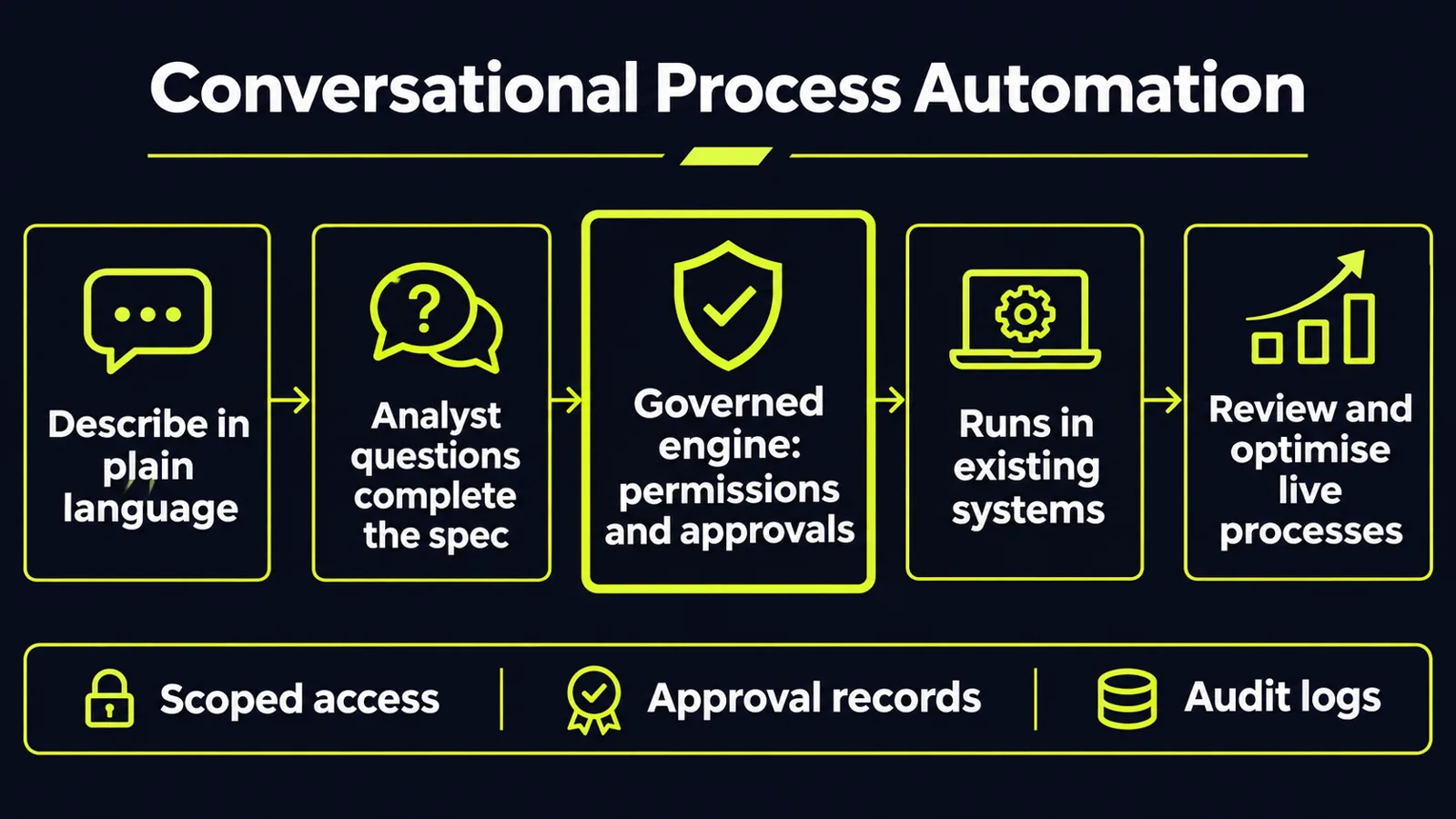
FlowForma Process Automation is a no-code platform for building, running and governing workflows natively on Microsoft 365 and SharePoint Online, per FlowForma brings process automation to Claude, ChatGPT and Microsoft Copilot, turning conversations into governed processes. The existing visual flow designer remains in place. What is new is a second way in: describe a process in plain language, and the assistant asks the questions a business analyst would, drafts the steps, forms, rules and branches, and sends a working specification to FlowForma, ready to run.
The examples given are ordinary, high-volume work: a purchase requisition, employee onboarding and an incident report. Users can also bring a running process into the conversation for review, and request a change such as a new approval route or form field in plain language. FlowForma says process execution, permissions, approvals and workflow data remain within the customer's Microsoft 365 environment, and that it is ISO/IEC 27001:2022 certified and a Microsoft AI Cloud Partner, per the same announcement. The capability is available now in all three assistants.
The important distinction is between conversational design and governed execution. FlowForma says its platform retains responsibility for permissions and approvals. The announcement does not specify how every AI-initiated change is authorised — and buyers should separately verify what process details reach the connected assistant, before treating the tenancy claim as the whole data story.
Related launches, different approaches to control
FlowForma was not alone. On November 3, Observe.AI announced a headless model that separates intelligence from interface: its Companion Agent processes conversations in real time and delivers structured events into the systems a team already uses, so the team decides where guidance appears and which workflows trigger, per Observe.AI Launches Headless Companion Agent to Bring Real-Time Guidance & Automation Into CX Agent's Desktop. The same intelligence can generate summaries, update systems of record and automate after-call work.
The approval gate shipped the same day in marketing tooling. Supermetrics extended its Claude integration from reporting to creating and editing campaigns; newly created campaigns are paused by default, while account-level approval settings govern how proposed changes are handled, per Yesterday's Marketing Technology & AI News: November 4, 2026. Cerillion's 26.2 release, announced November 4, makes a related point for service operations: its agentic functions run through a management centre and protocol servers, and operators decide which tools and data agents can access, with policy-based approvals and audit trails governing execution, per Cerillion 26.2 Extends AI From Customer Care to Churn Prediction.
Across process, service, marketing and operations software, vendors are adding AI to existing business systems. Their architectures differ, but they raise a common question: which system authorises an action, and where can an operator inspect what happened?
Why conversation is a good designer and a bad governor
Conversation is good at eliciting tacit knowledge. The person closest to a process rarely writes down the exceptions, the workaround for a missing field, or the approval that only happens when a value crosses a threshold. An assistant can ask about those cases one at a time, in context — though complex processes still need validation by the people responsible for them.
Conversation is bad at enforcement. A chat transcript does not prove who approved a step, which version of a rule ran, or whether a sensitive field reached the wrong person. Those are properties of an execution engine: permissions, versioned flows, approval records and logs. A conversational interface is not, by itself, an enforcement mechanism. FlowForma says workflow execution, permissions and approvals remain in its process platform; buyers should verify whether AI-initiated changes produce the version records and audit evidence their internal controls require.
Menlo Ventures estimated enterprise AI spending at $176.8 billion by September 2026, compared with $33 billion in 2025, and its research also found that surveyed enterprises spent 2.5 times their planned AI budgets, per Yesterday's Marketing Technology & AI News: November 4, 2026. Those findings concern enterprise AI broadly, not this tool category specifically, but they reinforce measuring usage and costs before deployment.
What to test before you trust it
Test the specification, not the demo. Select a process with documented rules, exception paths and expected outcomes. Build it through an unscripted conversation, then compare the result against those requirements. Record missed exceptions and manual corrections, and measure total time against the visual designer.
Test the boundary. Attempt a sensitive change using accounts with different permissions: widen an approval limit, add a recipient for sensitive data, or skip a required step. Verify that unauthorised requests are blocked and that permitted changes follow the organisation's configured approval requirements. Check the platform's actual state; a reassuring chat response is not evidence of enforcement.
Test change control. Make a small change through conversation and inspect the resulting record. Determine whether the platform identifies the requester, captures the change, preserves relevant versions and supports the rollback or recovery procedures your organisation requires.
Test what leaves the platform. Use a workflow with representative sensitive fields and inspect what reaches the connected assistant. Confirm the data-processing terms, retention controls and permissions that apply.
What this means for your business
1. Start with translation-heavy processes — as a low-risk pilot. The strongest candidates are well-documented, repeatable workflows where knowledge sits with one or two people, the steps are understood, and the delay is turning that knowledge into a working flow. Purchase requests, employee onboarding and incident reporting are examples cited by FlowForma, but select a low-risk implementation before moving to sensitive or business-critical workflows.
2. Keep design and execution separate in your own stack. Let assistants draft forms, rules and routings. Require evidence of enforceable permissions, approval rules and auditability before deployment. If a vendor cannot demonstrate those controls, limit the deployment to a controlled evaluation.
3. Name approvers before you enable creation. Define who may create workflows, who may modify live ones and which changes require review. Match approval requirements to the risk of the change, and distinguish permission to design a process from permission to deploy or modify a production process, so routine maintenance does not create an unnecessary backlog.
4. Budget for volume, not seats alone. Evaluate the full cost: platform licensing, AI assistant access, usage charges where applicable, integration work and maintenance. Track cost per successfully completed workflow alongside the effort saved.
5. Retire deliberately. FlowForma positions conversational creation as a way to rebuild workflows tied to older Microsoft tools, including InfoPath and SharePoint 2013 workflows. Inventory those processes first, retire unnecessary ones, and validate the rest against current requirements before migration.
FlowForma's announcement shows conversational AI becoming an interface for creating and changing workflows. The enterprise test is whether the resulting processes stay authorised, reliable and auditable after the conversation ends.
Ready to find where conversational process automation will actually pay back in your operation? Get a free AI audit — we'll map your highest-leverage automation opportunities in one session.
Sources
- https://www.prnewswire.com/news-releases/flowforma-brings-process-automation-to-claude-chatgpt-and-microsoft-copilot-turning-conversations-into-governed-processes-302928168.htmlprnewswire.com
- https://www.cmswire.com/the-wire/observeai-launches-headless-companion-agent-to-bring-real-time-guidance-automation/cmswire.com
- https://agilebrandguide.com/yesterdays-marketing-technology-ai-news-november-4-2026/agilebrandguide.com
- https://www.unite.ai/cerillion-26-2-extends-ai-from-customer-care-to-churn-prediction/unite.ai
Want to know what this means for your stack? A free AI audit maps your workflows and shows where automation pays off — in your numbers, not ours.