

Many enterprise assistants stop working the moment you stop typing. You ask, it answers, and the follow-through — tracking what changed, chasing missing inputs, escalating what matters — stays on your plate. On November 11, Databricks announced the second generation of Genie, a repositioning toward an always-on AI agent designed to carry out long-running work in the background, per Databricks Launches New Always-on Genie: Autonomous AI for Complex Enterprise Work. One status point belongs up front: Genie and Genie Ontology are generally available, while the always-on mode itself is coming soon to preview and beta programmes, per Databricks Genie stopped waiting to be asked. The announcement matters less as a feature list than as a governance question: how much background work can you delegate before governance becomes the limit?
What was announced on November 11
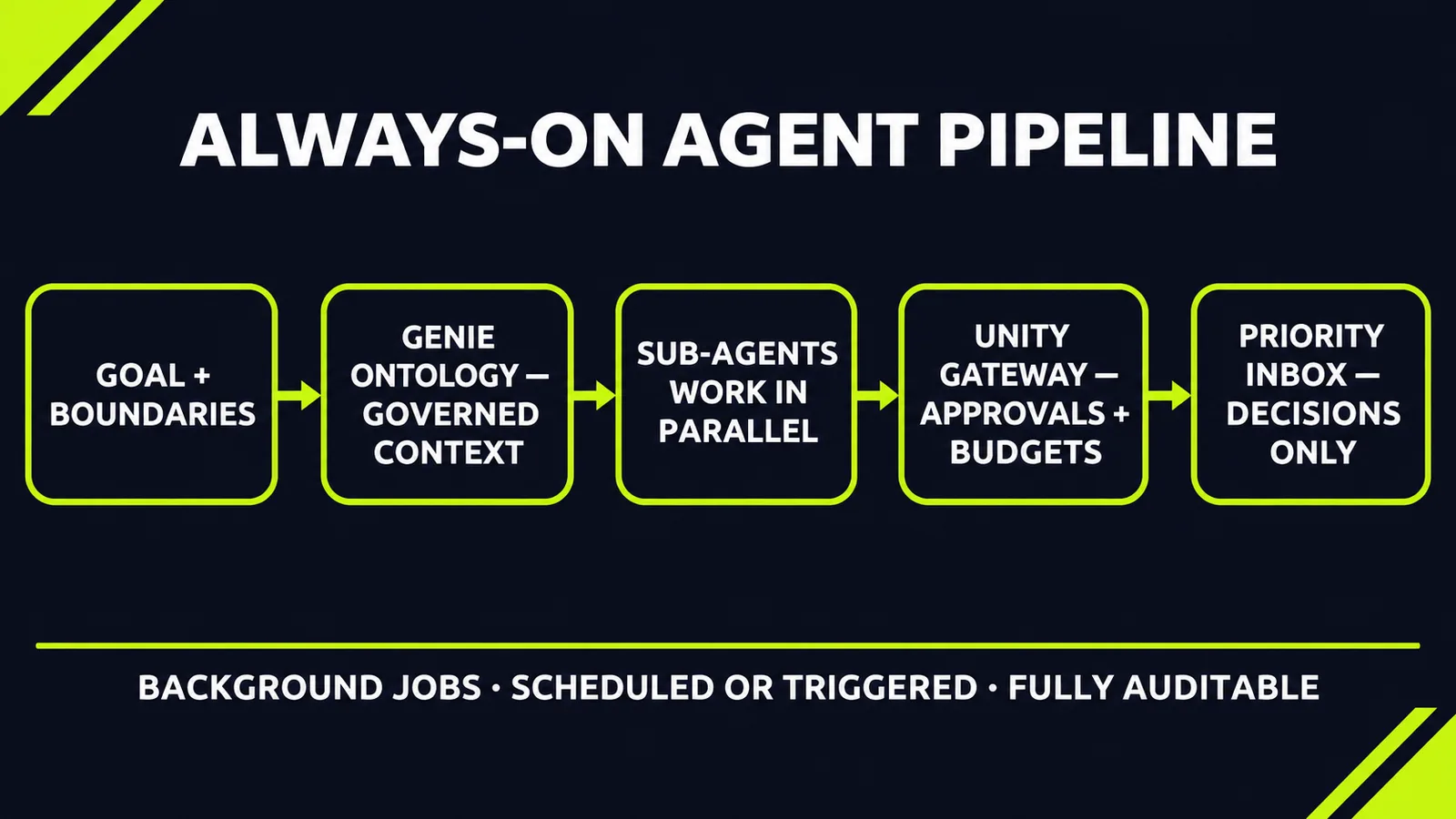
The always-on mode is designed to operate autonomously, running in the background using its own compute. Employees give it a goal and clear boundaries. It delegates parts of the work to sub-agents running in parallel, tracks progress, and follows up on missing inputs. It reaches out only when a person needs to make a decision, per the SD Times report linked above. Work can run on a schedule or in response to triggers, and several assignments can run at once, per Databricks Turns Genie Into an Autonomous Enterprise AI Coworker.
A new priority inbox surfaces what needs a decision instead of burying it in past conversations, and Genie emails users when they are away, with updates on an alert threaded to the same email thread, per the SD Times report linked above. Databricks gives these examples: monitoring customer usage patterns and notifying account teams of meaningful shifts, keeping a quarterly forecast on track, tracking revenue trends and customer feature requests into a weekly brief, and routing insurance claims that move outside underwriting guidelines, per the reports linked above.
Databricks says thousands of customers already use Genie in production — a vendor claim with no published denominator — and reports that General Motors has deployed more than 1,000 Genie agents across sales, engineering, supply chain and HR operations, per the Unite.AI report linked above. Treat that deployment as evidence of scale inside one committed customer, not as a typical starting point.
Context is the real product
Databricks argues this version can work in the background because of Genie Ontology, its context layer, now generally available. The ontology captures a company's horizontal context, from definitions and metrics to the people and processes behind them, and keeps it current as the business changes, per the SD Times report linked above. It builds reusable knowledge snippets from dashboards, queries and notebooks, while explicitly governed definitions are preserved, and a ranking system called OntoRank weighs source authority, certification, relevance, popularity and recency when definitions conflict, per the Unite.AI report linked above.
Genie Search is generally available for Google Drive, Jira, Confluence and Workday, with SharePoint in beta; it indexes content where it lives and enforces the source system's permissions before returning results, per the Unite.AI report linked above. Databricks says it now offers more than 100 connectors for key business apps, per the SD Times report linked above. Genie Agents can analyse PDFs, slide decks and other documents alongside governed tables in public preview, returning page-level citations, per the Unite.AI report linked above.
This is the part buyers should probe. An always-on agent is only as reliable as the definitions it works from. If your revenue definition lives in three dashboards with three different formulas, background autonomy does not fix that — it executes the confusion faster, while you are not watching.
Read the 91% benchmark with its fine print
Databricks released a benchmark developed with Turing. In the company's evaluation, Genie passed 91% of task runs, compared with 58% for the stronger of two anonymised frontier agents, while averaging 431,829 tokens and 100.3 seconds per run, per the Unite.AI report linked above. Each agent ran every task five times in the same workspace — a fictional energy supplier stocked with tables, notebooks, dashboards, saved queries and documents, including outdated and duplicated assets.
Databricks itself supplies the caveat, and it deserves equal weight: the test reflects an established deployment with accumulated business knowledge, and the gap may be smaller in a new deployment, or where table schemas alone are sufficient, per Databricks Genie stopped waiting to be asked. No independent evaluation has been published. Governed context is the variable being tested — and a new customer, by definition, starts without the accumulated context that produced the headline number.
Governance decides how much autonomy you actually grant
Every action stays within Unity Catalog permissions and Unity Gateway approval rules and budgets, and is fully auditable, per the SD Times report linked above. Traces capture the question, the answer, the cited objects, response time and actions taken; administrators can restrict which tools the agent may use, require approvals for defined actions, and set budgets and spending caps, while the agent acts under each user's own identity and permissions, per the Unite.AI report linked above.
In a walkthrough reported by Databricks' new AI agent tells CEO Ali Ghodsi the unvarnished truth, the chief executive used his own agent to examine low scores in an employee satisfaction survey, assess fixes executives had proposed, and summarise a sales pitch that had gone poorly. That is the intended role: not replacing judgement, but surfacing a direct summary of work that normally gets softened on its way up. It also underlines a dependency the walkthrough implies rather than proves: usefulness depends on the underlying surveys, pitches and documents being accessible inside a governed environment.
Cost control gets a mention, not a price list. Genie One, the interface for this work, is free for users through January 31, 2027, with Databricks saying more detailed cost controls will be available before then, per the Unite.AI report linked above. No price for the always-on mode itself has been published, so any business case today rests on pilot measurements, not vendor pricing pages.
What this means for your business
1. Audit your definitions before you delegate background work. Pick your ten most-used metrics and check whether each has one governed definition, one owner and one source of truth. An always-on AI agent multiplies whatever it finds — clarity or conflict. This cleanup is unglamorous, and it is the actual prerequisite.
2. Start with monitoring work, not acting work. The lowest-risk pattern in this launch is watch-and-alert: usage shifts, forecast drift, claims moving outside guidelines, trends compiled into a weekly brief. Let the agent prove its judgement on notifications while a person still makes every consequential move, then widen authority in steps you can name.
3. Set approval boundaries and error ownership in writing before the pilot. Which actions run alone, which need approval, which are never permitted, what the spending cap is — and who is accountable when the agent acts on a stale definition or sends a wrong alert, plus how that error gets corrected. If those answers are not written down, you are not piloting an agent; you are hoping supervision happens by itself.
4. Do not import the benchmark into your business case — build your own. The 91% figure came from an established deployment, in the vendor's own evaluation. Run your own tasks, on your own data, five times each, and measure three things: decisions accelerated, errors caught, and cost per completed task. That small internal benchmark is the only honest basis for expanding beyond a pilot.
5. Price the platform dependency — including the exit. Genie runs inside an existing Databricks environment and inherits its governance. If your data and documents already live there or connect cleanly, the path is short. If they do not, migration and context-building is the project — the agent is the last step. Ask what happens to your ontology and accumulated context if you leave; an unclear answer is a lock-in cost to price in now.
6. Assign an owner for the inbox — and for the traces. A priority inbox only works if a named person clears it, on a defined cadence, with authority to decide escalations. The same applies to oversight: schedule a weekly review of what the agent actually did, not just what it flagged. Background agents fail quietly when escalations pile up unread and nobody reads the audit trail.
7. Name the roles that change. If an agent compiles the weekly brief and chases missing inputs, the analyst who used to do that work does something else — say what, in advance. Pilots that skip this question meet resistance that has nothing to do with the technology.
The principle is portable, whatever platform you run: autonomy scales with governed context and explicit approval boundaries.
Ready to find where automation would cut cost or cycle time in your operation? Get a free AI audit — we'll map your highest-leverage automation opportunities in one session.
Sources
- https://sdtimes.com/data/databricks-launches-new-always-on-genie-autonomous-ai-for-complex-enterprise-work/sdtimes.com
- https://www.unite.ai/databricks-turns-genie-into-an-autonomous-enterprise-ai-coworker/unite.ai
- https://techcrunch.com/2026/11/11/databricks-new-ai-agent-tells-ceo-ali-ghodsi-the-unvarnished-truth/techcrunch.com
- https://www.derringtoncollaborativeai.com/briefing/databricks-genie-always-on-coworkerderringtoncollaborativeai.com
Want to know what this means for your stack? A free AI audit maps your workflows and shows where automation pays off — in your numbers, not ours.