

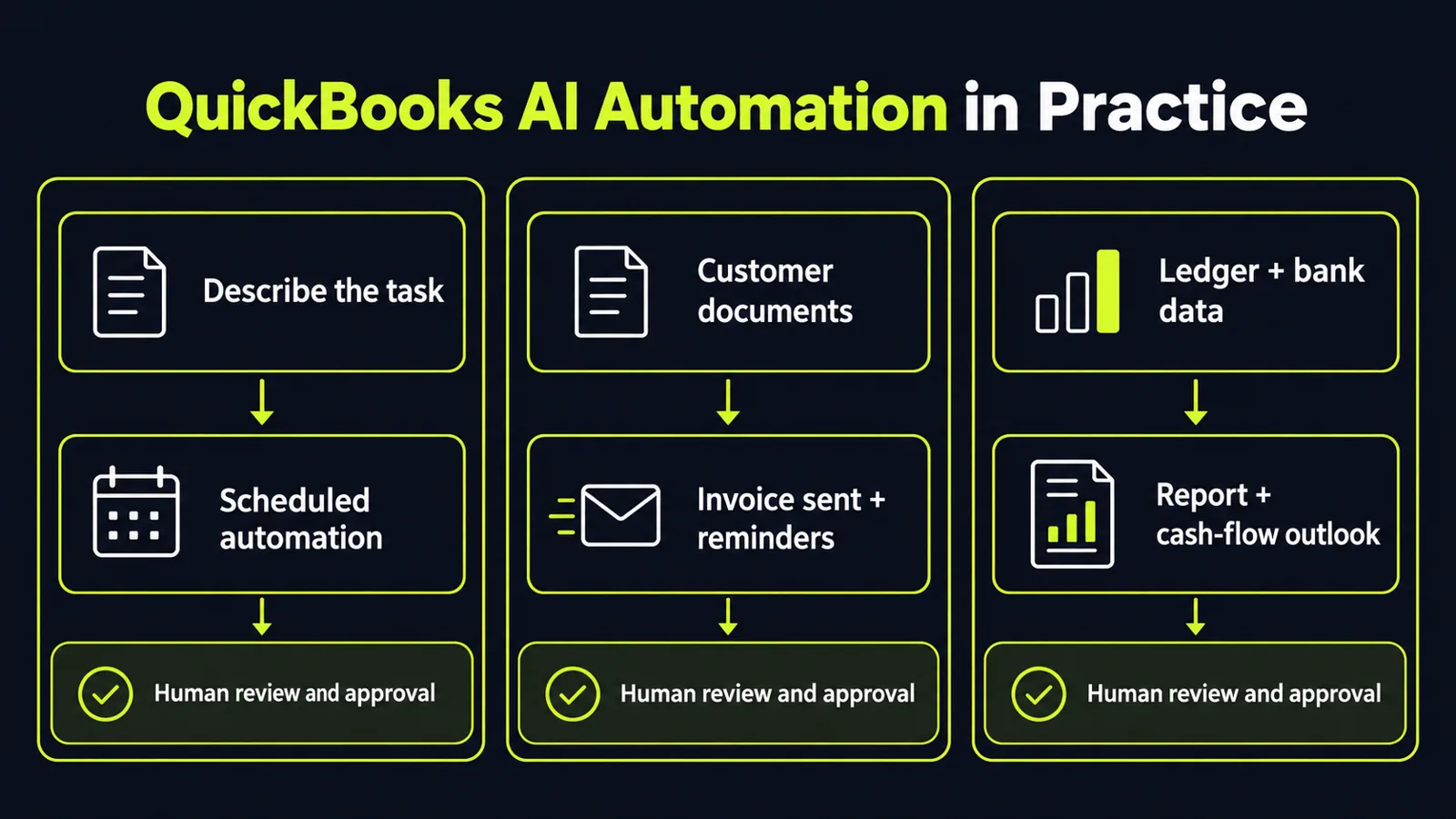
On October 14, 2026, Intuit announced the international rollout of Intuit Intelligence. The new capabilities are rolling out in beta to QuickBooks Online and QuickBooks Online Advanced, with Intuit Accountant Suite availability varying by product. The headline is not another chat box inside accounting software. It is three specific capabilities — recurring tasks described in plain language, invoices created from customer documents with routine reminders handled automatically, and custom reports built conversationally with a forward view of cash flow — inside a connected system where a business and its accountant share the same financial view, while decisions stay human. That is a testable claim, and it should be tested like one.
Key takeaways
- Three automations, not a vague assistant. Automations, Autonomous Invoicing and Conversational Custom Reports are the business-facing core, per Intuit Intelligence Now Available Internationally, Fueling Success for Businesses and Accountants on One Unified Platform.
- The early numbers are specific enough to audit. Early adopters report saving an average of 13 hours a month, 70% say they are confident their books are done correctly, and accountants report 30% more time on advisory work — all Intuit-reported figures, not independent benchmarks.
- The architecture is deliberately mixed. Each task is routed to large language models for reasoning, machine learning for prediction, or deterministic code where precision matters.
- Beta means staged, not finished. Features are rolling out in beta for QuickBooks Online and QuickBooks Online Advanced, with Accountant Suite availability varying by product, per Intuit launches global AI rollout: USD 84.9 billion values Intuit stock.
What Intuit announced — and what is still in beta
Automations lets a user describe a recurring task conversationally and turns that description into an automation that runs on its own schedule. Autonomous Invoicing creates and sends an invoice from the customer's own documents, then handles reminders and updates automatically. Conversational Custom Reports builds a tailored report from a request and adds a forward-looking cash-flow view drawn from ledger history, bank activity and predictive models, per Intuit Intelligence Now Available Internationally, Fueling Success for Businesses and Accountants on One Unified Platform.
On the accountant side, the additions are about portfolio work. Cross-client portfolio insights surface signals across a firm's full client list without opening each file in turn. Firm Playbooks let a firm record its setup, service standards and onboarding once and apply them to new clients. Updates to Unified Inbox centralise client communication. None of this is glamorous. That is the point: time in finance operations leaks away in categorisation, chasing, re-keying and one-file-at-a-time review.
The shared-platform point matters too. Businesses and accountants have historically worked from separate systems, exchanging documents and duplicating effort. One connected view of the same data is designed to reduce those manual handoffs — Intuit has published no comparative error-rate results for this rollout, and both sides still have to adopt it, which is a change-management question, not a software question.
Read the numbers like a buyer, not a headline
Intuit says the platform draws on data from 10 million customers and tracks roughly 625,000 attributes per business on average, per Intuit expands AI platform. Intuit stock falls 1.98 percent. Treat that as context, not proof. Scale explains why prediction features such as cash-flow outlooks and anomaly signals are plausible; it does not tell you whether categorisation will be accurate on your chart of accounts, your tax rules or your messy supplier names.
The outcome figures need the same discipline. Saving 13 hours a month, 70% confidence in the books, and 30% more advisory time are early-adopter, vendor-reported results, summarised in Intuit Has Launched Financial AI Platform Globally as well as in the launch release. Early adopters tend to have cleaner data and more support, and the announcement gives no sample or method detail. Treat the figures as vendor-reported averages to test against, not results to expect or savings to book. Measure your baseline first — invoicing and chasing hours, categorisation corrections per month, and days from invoice sent to payment received. Without a baseline, any automation claim is unfalsifiable.
Intuit also does not present this as removing people from finance. Decisions and approvals stay with the owner and the accountant, and the company notes the system can make mistakes. In bookkeeping that is not caution theatre — a confident wrong categorisation creates rework and, in the worst case, a filing problem. Human review is the control that makes the automation usable. That fits Intuit's own 2026 AI Impact Report, cited in the launch, which found trust — not cost — is now the main barrier to deeper adoption, even as regular use approaches 70%.
The design choice worth copying
The most transferable lesson is architectural. Intuit Intelligence does not rely on a single model. It selects technology per task: language models where reasoning over unstructured input is needed, machine learning where the job is prediction from history, and deterministic code where the answer must be exact and repeatable. That is how finance automation should be built anywhere, including in custom systems that never touch QuickBooks.
Apply the same split to your own workflows. Let a model draft, extract and summarise — invoice details, variance explanations, first-pass narratives. Let predictive models flag what is unusual — a cash shortfall, a late payer, a mismatched category. Let rules and code do the arithmetic, posting and reconciliation, where an almost-right answer is a wrong answer. Teams that hand all three jobs to one generative model get fluent output and fragile books. The boundary between them is the engineering decision.
What this means for your business
1. Pilot the three features in that order: reports, automations, invoicing. Start with Conversational Custom Reports, because a wrong report is visible and reversible. Move to Automations for low-risk recurring tasks with a clear owner and an exception path. Put Autonomous Invoicing last, even though it promises the fastest cash benefit, because it touches customers: test it on a small set of invoices, review every document extraction, and check the tone and timing of automatic reminders before widening it.
2. Keep a named human approver on every money-moving step — and verify access before you start. Define in writing what the system may do alone (categorise for review, draft, remind), what needs approval (sending, posting, changing payment details), and what happens when a source record is incomplete or disputed. Before planning around any feature, confirm it is enabled for your subscription and what terms or fees apply, and ask how permissions and activity history are handled when client data is involved. Log corrections for the first month; a rising correction rate is your signal to narrow the automation.
3. Judge it on cash, corrections and total cost, not on hours claimed. Track invoice-to-payment time, overdue balance, categorisation correction rate, review effort and close time before and after the pilot, alongside any added software cost. If hours fall but corrections rise, you have moved work, not removed it. If payment arrives faster with no rise in disputes, you have found real value — expand that workflow first.
4. If you do not run QuickBooks, copy the pattern, not the product. Most finance stacks can assemble the same three layers: conversational task setup, document-to-invoice automation, and reporting with a forward view. The buying question is identical — which steps are generative, which are predictive, which are deterministic, and where does a person approve? A vendor who cannot answer clearly has not finished the engineering.
Intuit's bet is straightforward: growth will come less from selling more seats and more from systems that do defined finance work inside software teams already use, as Intuit launches global AI rollout: USD 84.9 billion values Intuit stock also notes. The value will be decided in the unglamorous details — data quality, approval rules, and whether anyone measured the baseline before switching it on.
Want an independent review of which finance and operations workflows are safe to automate — and which need a human in the loop? Get a free AI audit — we'll map your highest-leverage automation opportunities in one session.
Sources
- https://www.businesswire.com/news/home/20261013268585/en/Intuit-Intelligence-Now-Available-Internationally-Fueling-Success-for-Businesses-and-Accountants-on-One-Unified-Platformbusinesswire.com
- https://www.ad-hoc-news.de/boerse/corporate-news/intuit-launches-global-ai-rollout-usd-84-9-billion-values-intuit-stock/70328008ad-hoc-news.de
- https://www.ad-hoc-news.de/boerse/corporate-news/intuit-expands-ai-platform-intuit-stock-falls-1-98-percent/70324413ad-hoc-news.de
- https://wisevoter.com/world/2026/10/14/intuit-launches-intelligence-platform-globallywisevoter.com
Want to know what this means for your stack? A free AI audit maps your workflows and shows where automation pays off — in your numbers, not ours.