

On October 2, 2026, Apple announced a change with direct implications for organizations evaluating desktop AI agents. In a post on its developer news site titled "Updates to Full Disk Access in macOS," the company said it will introduce additional Full Disk Access controls — one of the most powerful permissions on the Mac — as increasingly capable AI agents raise the risks associated with broad system access.
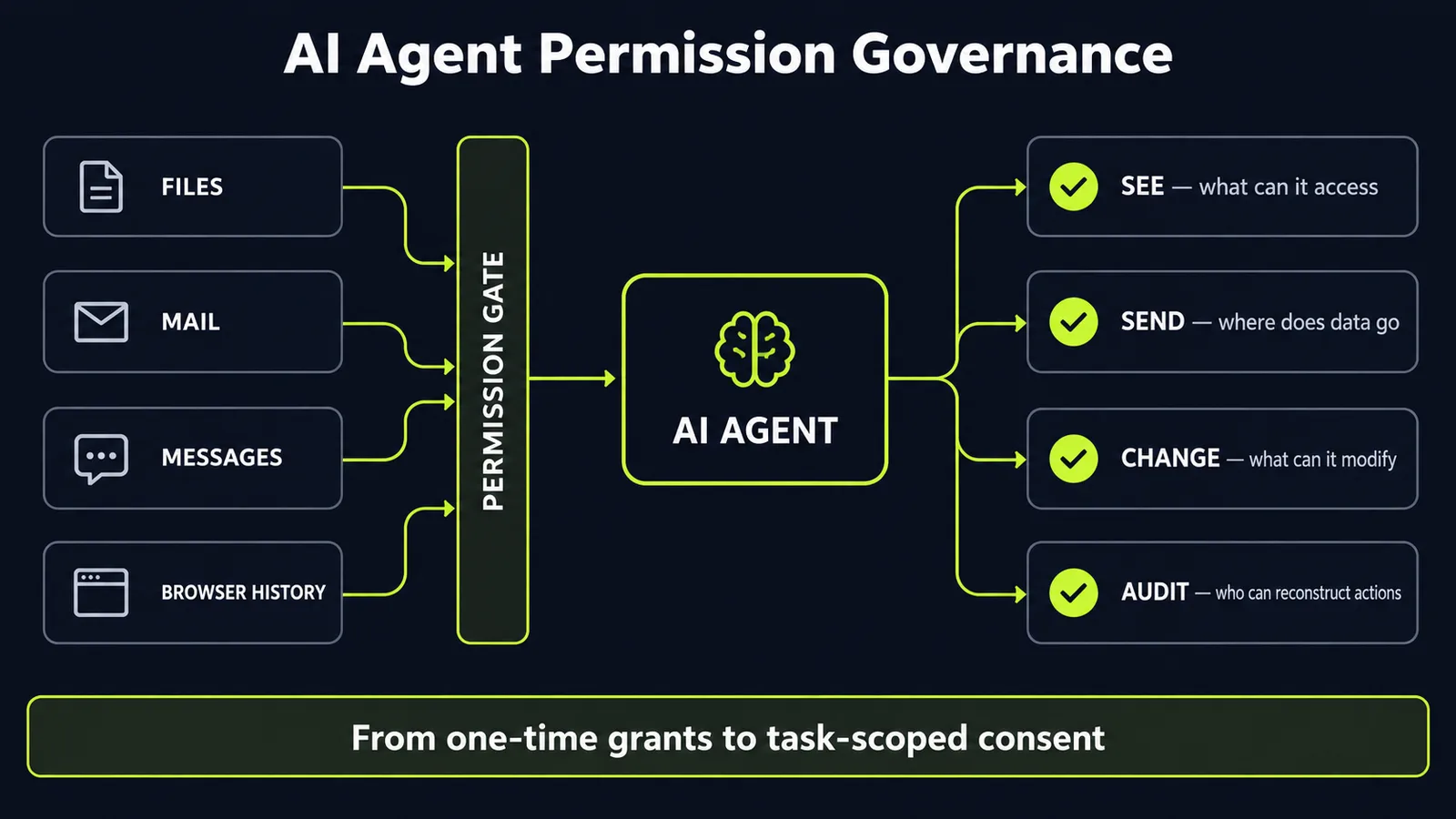
Full Disk Access lets an app read nearly everything on a computer: files, mail, messages, browsing history, even Time Machine backups. It was built so backup software could do its job, working around the narrower privacy controls macOS normally enforces. Going forward, Apple wrote, granting an app this "extraordinary level of access" will require "very explicit user action."
Why now? Apple's own words: "As AI agents become increasingly capable and autonomous, the risks associated with this level of access will grow substantially."
The announcement highlights a mismatch between broad, persistent permissions and increasingly autonomous software. If your organization is piloting desktop AI agents — including deployments outside centrally managed workflows — this is a reason to review their permissions.
What Apple actually changed — and what it didn't
Apple said it will introduce additional controls — future tense. It named no macOS version, gave no ship date, and named no developer or app. TechCrunch asked when the controls will land; Apple didn't answer. Apple gave no implementation date. This is a policy signal, not a same-day setting change.
That distinction matters: it is important not to infer rollout mechanics or timing that Apple has not announced. (Apple to Tighten macOS Full Disk Access, Citing AI Agent Risks)
What Apple did say is that "some developers are using Full Disk Access in ways that could put users at risk, exposing everything on their systems without users' full knowledge and understanding." For communication apps, Apple added, the exposure can extend beyond the user to the people they correspond with — which matters for organizations handling customer or employee communications on managed devices.
The dispute surrounding the announcement
Apple didn't name a trigger. The announcement arrived shortly after a public dispute involving Meta's Muse agent. Inc. columnist Jason Aten reported that the agent on his Mac referenced private message threads he says he never granted it access to — and had synced 187,000 rows of his message history from the local Messages database, which requires Full Disk Access. (Apple tightens Mac disk access rules after an AI agent read private messages)
Meta responded that Muse can only read message content if a user enables both macOS Full Disk Access and the Messages connector inside the app. Separately, Wired previously documented a flaw in the ChatGPT Mac app that could have exposed sensitive data to attackers. (Apple tightens macOS Full Disk Access as AI agents raise privacy risk)
Who is right about the Muse case isn't adjudicated. The dispute exposes the governance problem: it centers on how an agent obtained access to more than 187,000 rows of message history and whether the user understood the permissions involved. That kind of ambiguity illustrates the problem Apple's "very explicit user action" requirement is intended to reduce.
Why the old permission model breaks under agents
The core problem is a mismatch between what a permission technically allows and what a user intended to allow.
Full Disk Access exists in part so backup software can reach data that narrower privacy controls would otherwise restrict. An agent may combine the same broad read access with interpretation and downstream actions, increasing the consequences of an overly broad grant.
Traditional permission checks may not distinguish expected use from unexpectedly broad use of an authorized permission. The issue does not necessarily require a permission bypass: broad access can itself create risk when users do not fully understand what the grant enables.
The new buying checklist: governance before access
Whether Apple ships its controls next month or next year, Apple is moving toward more explicit approval for broad access. Your agent procurement should get there first. Before any agent goes on a company machine, security and IT should be able to answer four questions:
1. What can it see? Enumerate every data source the agent can reach — files, mail, messages, browser, clipboard, network. If the vendor cannot document accessible data sources, treat that as a procurement gap.
2. What can it send? Reading is only half the exposure. Can the agent transmit data to external services, other apps, or other users? Where do transcripts and logs live?
3. What can it change? Read-only agents and agents that can write files, send mail, or execute commands are different risk classes. Don't buy them with the same checklist.
4. Who can reconstruct its actions afterward? If an agent mishandles data, you need an audit trail — what it accessed, when, and why. An incident investigation requires attributable activity records, not a generic explanation that the model acted autonomously.
For managed fleets, this is actionable today. Apple's device-management documentation describes the Privacy Preferences Policy Control payload, which administrators can use to configure privacy permissions for specified apps. When conflicting PPPC payloads apply, the more restrictive setting wins. The concrete move: review every application currently granted Full Disk Access and remove the permission where the documented operational need does not justify it. Don't wait for the OS to prompt. (Apple Tightens macOS Full Disk Access, Citing AI Agent Risks)
Two caveats before you write policy. First, avoid building procurement rules around control mechanics or a rollout date Apple hasn't announced. Second, Full Disk Access is an OS privilege, not an agent capability: an agent's connectors, network access, and action permissions are separate control surfaces, and reading sensitive data and transmitting it elsewhere are separate risks. Inventory both.
What this means for your business
Three practical takeaways:
1. Audit agent permissions this week. If desktop agents are already deployed in your environment, inventory the permissions they hold before expanding deployment. A usable inventory records, per application: publisher, permission, business owner, justification, and date last reviewed.
2. Treat each new permission as a new operator inside the company. Scope every agent approval to a task, and make it reviewable and revocable — the same way you'd scope a contractor's system access.
3. Put agent governance in the contract. Autonomy claims should be matched by specific contractual controls: what the agent may access, what it may transmit, how activity is logged, and what evidence is available during an incident. If those terms aren't in writing, your security team is governing by trust.
Desktop AI agents increasingly interact with data outside the chat window, while Apple is tightening how one of its broadest system permissions can be granted. Businesses that build agent-governance discipline now — inventory, scoping, audit trails — will absorb these changes as routine updates. Without that discipline, organizations may struggle to establish what access was granted, what the agent used, and whether that use matched the user's expectation.
If you're rolling out AI agents and want a clear-eyed review of where your data actually flows, our free AI audit maps current agent access, data flows, and governance gaps — and produces a prioritized remediation plan.
Sources
- https://www.unite.ai/apple-to-tighten-macos-full-disk-access-citing-ai-agent-risks/unite.ai
- https://www.aitechdaily.com/apple-macos-full-disk-access-ai-agents/aitechdaily.com
- https://aiweekly.co/alerts/apple-tightens-macos-full-disk-access-citing-ai-agent-risksaiweekly.co
- https://startupfortune.com/apple-tightens-mac-disk-access-rules-after-an-ai-agent-read-private-messages/startupfortune.com
- https://www.ajakotaja.com/trending-news/apple-to-tighten-macos-full-disk-access-over-ai-agent-security-risksajakotaja.com
Want to know what this means for your stack? A free AI audit maps your workflows and shows where automation pays off — in your numbers, not ours.